Virtual Assistants for Law Firms: The Complete Guide


Virtual assistants for law firms are remote professionals who handle administrative, clerical, and legal support tasks for attorneys from an offsite location. They work as a direct extension of your team, without requiring a desk, equipment, or a benefits package. If your attorneys spend more time on scheduling and paperwork than on billable client work, a virtual legal assistant is the most direct fix.
What Is a Virtual Legal Assistant?

A virtual legal assistant is a trained remote professional, not an AI tool, who performs real legal support work under attorney supervision. They handle the same tasks an in-house legal secretary or paralegal would handle, but they work remotely and cost significantly less.
This is different from AI-powered legal software like Harvey or Clio's AI tools. Those tools generate text or surface information. A human virtual legal assistant manages your calendar, speaks with clients, prepares documents, and keeps your cases organized every single day.
Think of them as a remote team member, not a contractor you hand tasks to and forget. The best placements we make at ClearDesk are ones where the attorney treats the VA like a core part of the firm, not an outsider.
Tasks a Virtual Assistant for Law Firms Can Handle

A skilled law firm virtual assistant can take on almost every non-courtroom task that currently eats attorney time — an average of two hours daily, according to Bloomberg Law. Here is what that looks like in practice.
Administrative Support and Scheduling
Your virtual legal assistant manages your calendar, sets appointments, coordinates depositions, and handles travel logistics. They send reminders, reschedule conflicts, and keep your day organized so you can focus on client work.
Client Communication and Intake
They answer calls, respond to emails, conduct initial client screenings, and follow up with leads. For high-volume practices, this alone can recover several billable hours each week.
Document Preparation and Management
They draft correspondence, format legal documents, organize case files, and maintain your document management system. Attorneys review and sign. The assistant handles the prep work.
Legal Research and Case Summaries
An experienced virtual legal assistant can conduct preliminary research, compile case law summaries, and prepare background materials for attorney review. This is especially useful for solo practitioners who currently do all research themselves.
Billing and Time Tracking
They enter time records, prepare invoices, follow up on unpaid accounts, and handle basic bookkeeping tasks.
CRM and Database Management
They update client records, maintain your CRM, and keep contact information current. For firms using intake software or legal CRMs, this is a natural fit for a virtual legal assistant.
Marketing and Client Development Support
They manage social media, draft email newsletters, update your website, and support outreach to prospective clients. This is often the task attorneys know they should do but never have time for.
Benefits of Hiring a Virtual Legal Assistant for Your Law Firm
Law firms that hire virtual legal assistants consistently report the same outcomes: more time for billable work, lower overhead, and better client responsiveness. Here is why the model works.
Significant Cost Savings Compared to Local Hires

A full-time in-house legal assistant in most U.S. markets costs $50,000 to $70,000 per year in salary alone, before benefits, payroll taxes, office space, and equipment. A virtual legal assistant through ClearDesk starts at $2,500 per month, with no long-term contract required.
That is a savings of up to 60 to 70 percent compared to a local hire. For a solo practitioner or small firm, that difference is significant.
More Time for Billable Client Work
Clio's Legal Trends Report found that attorneys spend an average of only 2.9 hours per day on billable work. The rest goes to administrative tasks. A virtual legal assistant takes those tasks off your plate so you can bill more hours without working more hours.
Flexible Staffing Without Long-Term Commitments
Caseloads fluctuate. A virtual legal assistant gives you the ability to scale support up or down without the constraints of a traditional employment contract. At ClearDesk, we operate without long-term lock-in, so you are never stuck paying for support you no longer need.
Access to Pre-Vetted and Trained Legal Talent
We process more than 55,000 applications per quarter and accept fewer than 0.5 percent of candidates. Every virtual legal assistant we place has been screened for communication skills, legal industry experience, software proficiency, and reliability before they ever meet a client.
Reduced Hiring and Onboarding Burden
Finding, interviewing, and onboarding a legal assistant takes weeks and significant management time. When you work with ClearDesk, we handle sourcing, vetting, and initial training. You meet qualified candidates and choose who you want to work with.
How Much Does a Virtual Legal Assistant Cost?
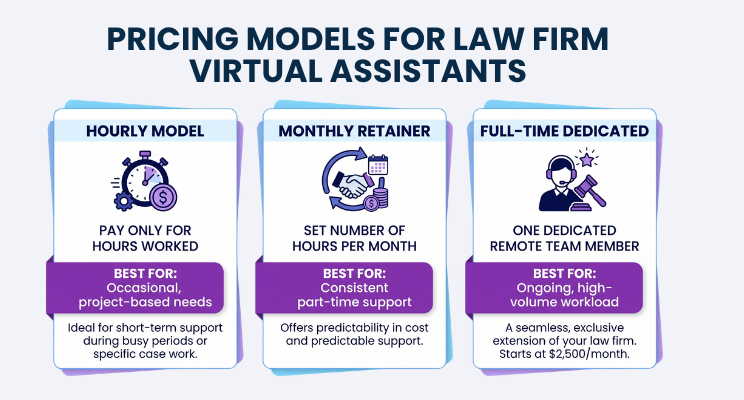
Pricing for virtual legal assistants varies based on experience level, scope of tasks, and whether you need part-time or full-time support. Here are the three most common pricing models.
Pricing Model | Best For | What to Expect |
Hourly | Occasional, project-based needs | Pay only for hours worked |
Monthly Retainer | Consistent part-time support | Set number of hours per month |
Full-Time Dedicated | Ongoing, high-volume workload | One dedicated remote team member |
At ClearDesk, full-time dedicated placements start at $2,500 per month. Factors that influence cost include the assistant's experience level, whether they have paralegal-level skills, and the complexity of tasks you need covered.
One honest limitation worth noting: ClearDesk does not offer generic, part-time, or shared staffing. Every placement is a dedicated professional who works exclusively for your firm during their hours. This is by design. Shared assistants split their attention, and that creates gaps in quality and responsiveness.
How to Choose the Right Virtual Assistant for Attorneys
Not every virtual legal assistant is the right fit for every firm. Here is what to look for when evaluating candidates or providers.
Evaluate Communication and Language Skills
Client-facing tasks require clear, professional English communication. During interviews, pay attention to how candidates explain things, not just whether they answer correctly. Written communication matters as much as verbal.
Verify Legal Industry Experience
Prior experience working in a law firm setting helps an assistant understand terminology, workflows, and the pace of legal work. An assistant who has never worked in legal will have a steeper learning curve.
Confirm Legal Software Proficiency
Ask specifically about the tools your firm uses. Common platforms include Clio, MyCase, PracticePanther, Filevine, and legal CRMs. Familiarity with these tools shortens onboarding time significantly.
Assess Cultural Fit and Reliability
A virtual assistant who aligns with your firm's pace, communication style, and expectations will outperform a more technically skilled candidate who is a poor fit. Ask about availability, responsiveness standards, and how they handle competing priorities.
Review the Provider's Vetting and Training Process
The quality of the assistant depends entirely on the rigor of the selection process behind them. At ClearDesk, every candidate goes through a multi-stage screening process that includes skills assessments, communication evaluations, and background checks. We have a 4.9 out of 5 client satisfaction rating because we are selective before placement, not reactive after problems arise.
Book a Discovery Call to see exactly how our vetting process works and whether ClearDesk is the right fit for your firm.
How to Work Effectively with Your Law Firm Virtual Assistant

Placing the right person is only half the work. How you integrate them into your firm determines how much value they deliver.
Set Clear Expectations from Day One
Before your assistant starts, write down the tasks they own, the deadlines that apply, and how you want to be updated. Ambiguity at the start leads to frustration on both sides.
Establish Communication Protocols and Check-Ins
Decide how you will communicate, whether by email, Slack, video call, or phone, and how often. A weekly check-in of 15 to 30 minutes is enough to keep most virtual legal assistants aligned with your priorities.
Provide Detailed Instructions and Regular Feedback
Document your processes in writing. When your assistant completes a task incorrectly, explain specifically what needs to change. Vague feedback produces vague improvement.
Use Collaboration and Project Management Tools
Project management tools like Asana, Monday.com, ClickUp, or even a shared Google Doc can track task status and keep everyone organized. Your legal practice management software, such as Clio or MyCase, can also serve as the central hub for case-related tasks.
Invest in Building the Relationship Over Time
We have seen this pattern repeatedly with our clients: the firms that get the most from their virtual legal assistants are the ones that treat them like real team members. Include them in team meetings, share context about cases they support, and recognize good work. That investment pays back in loyalty and long-term performance.
Legal Software and Tools Virtual Legal Assistants Use

A capable online legal assistant should be proficient with the tools your firm already uses. Here are the main categories.
Practice Management Platforms
Clio (most widely used)
MyCase
PracticePanther
Filevine
Smokeball
Document Management Systems
NetDocuments
iManage
SharePoint
Google Drive (for smaller firms)
Client Intake and CRM Software
Lawmatics
Clio Grow
Salesforce (customized for legal)
HubSpot
Billing and Accounting Tools
QuickBooks
Clio Billing
TimeSolv
Bill4Time
Communication and Collaboration Applications
Slack
Zoom
Microsoft Teams
Asana or ClickUp for task management
Practice Areas That Benefit from Virtual Legal Support

Virtual assistant legal services are not one-size-fits-all. Different practice areas have different needs, but most benefit from remote support in meaningful ways.
Personal Injury Law Firms
High case volumes, extensive documentation, and frequent client follow-up make personal injury practices one of the strongest fits for virtual legal staff. Demand letters, medical record requests, and intake coordination are all tasks a VA can own.
Family Law Practices
Client communication is frequent and emotionally sensitive in family law. A virtual legal assistant who handles scheduling, follow-up, and document prep frees attorneys to focus on the legal strategy their clients need.
Estate Planning and Probate
Document preparation and client intake are the backbone of estate planning work. Both tasks are well-suited for a trained virtual legal assistant operating under attorney supervision.
Immigration Law
Immigration cases involve strict deadlines, complex forms, and ongoing client updates. A dedicated virtual assistant keeps the administrative side organized so attorneys can focus on case strategy and compliance.
Criminal Defense
Research support and court scheduling help criminal defense attorneys manage heavy caseloads without missing deadlines or details.
Real Estate Law
Transaction coordination, document organization, and title-related correspondence are natural fits for a virtual legal assistant with real estate experience.
A Real Example: How One Firm Reclaimed Attorney Time

One of our clients, a personal injury attorney running a solo practice with two support staff, came to us because he was spending four to five hours each day on tasks that had nothing to do with practicing law. He handled his own scheduling, drafted his own correspondence, and managed client intake personally.
We placed a full-time virtual legal assistant with prior personal injury experience. Within three weeks, she owned client intake, managed his calendar, and drafted all routine correspondence. By month two, she was handling medical record requests and billing follow-up.
He recovered roughly 20 hours per week of attorney time. That translated directly into more client consultations, more cases accepted, and measurably higher monthly revenue. The placement cost him $2,500 per month. At an average hourly rate of $349 as reported by Clio, the additional billable hours he recovered were worth several times that.
Challenges to Consider When Hiring Virtual Legal Staff

Transparency matters. Here are the real challenges law firms face when working with virtual legal staff, and how to address each one.
Confidentiality and Data Security
Attorney-client privilege is non-negotiable. Before a virtual assistant accesses any client information, require a signed confidentiality agreement. Use secure file-sharing platforms and limit access to only the files relevant to their work. At ClearDesk, every assistant signs an NDA as part of the placement process.
Time Zone Coordination
Many virtual legal assistants work during standard U.S. business hours, but confirm this before placement. If your firm needs live phone coverage from 9 a.m. to 5 p.m. in your time zone, make that a requirement from the start.
Training on Firm-Specific Procedures
Every firm operates differently. Plan for one to two weeks of onboarding where your assistant learns your specific workflows, software, and communication standards. Document your processes in writing to speed this up.
Managing Remote Team Performance
Set clear performance metrics from the start. Track task completion rates, response times, and accuracy. Use your project management tools to maintain visibility into what your assistant is working on. Regular check-ins prevent small issues from becoming larger ones.
Where to Find Virtual Legal Assistant Companies
You have three main options when sourcing virtual legal staff.
Specialized legal staffing firms: These providers focus exclusively on law firm placements. They understand legal terminology, workflows, and compliance requirements. The tradeoff is that they may have a narrower talent pool.
General remote staffing companies: Providers like ClearDesk place virtual assistants across industries, including legal. They offer rigorous vetting, ongoing support, and a broader talent pool. ClearDesk placements include legal assistants, paralegal virtual assistants, intake specialists, and more.
Freelance marketplaces: Platforms like Upwork or Fiverr allow you to find and hire candidates independently. You handle all vetting, onboarding, and management. This option requires the most time investment and carries the most risk.
For most law firms, working with a structured provider is the right call. The vetting is done before you ever speak with a candidate, and you have a support structure in place if issues arise.
How to Get Started with a Virtual Legal Assistant

Here is the step-by-step process we walk our clients through at ClearDesk.
1. Define the Tasks You Want to Delegate
Write down every task you want to delegate that currently takes your time but does not require your legal expertise. Be specific. "Administrative work" is too broad. "Drafting client follow-up emails and managing the intake calendar" gives a provider something to match against.
2. Determine Your Budget and Schedule Requirements
Decide whether you need full-time or part-time support and what you can spend per month. At ClearDesk, full-time dedicated placements start at $2,500 per month with no long-term contract.
3. Research and Vet Potential Providers
Compare virtual assistant companies based on their acceptance rates, vetting process, client satisfaction scores, and support structure. Ask how they handle a situation where a placement is not working out.
4. Interview and Select Your Virtual Legal Assistant
Meet candidates directly. Assess their communication skills, legal experience, and software proficiency. Ask them to walk you through how they would handle a specific task relevant to your practice.
5. Onboard and Establish Communication Systems
Set up your tools, share your process documentation, and schedule an initial training session. Define how you will communicate, how often you will check in, and what success looks like in the first 30 days.
Build a Stronger Law Firm with the Right Virtual Legal Staff
Attorneys who delegate administrative work to a qualified virtual legal assistant consistently report the same outcome: more time for the work that actually grows their practice. Less time on scheduling and paperwork means more time for client consultations, case strategy, and billable hours.
At ClearDesk, we have placed virtual legal assistants with solo practitioners, small firms, and growing practices across multiple areas of law. Our 4.9 out of 5 client satisfaction rating and less than 0.5 percent candidate acceptance rate reflect a process built around quality, not volume.
If you are ready to see what the right virtual assistant can do for your firm, Book a Discovery Call and we will walk you through exactly how the process works.
Frequently Asked Questions
Q: Can a virtual legal assistant handle court filings and e-filing systems?
A: Yes. Many virtual legal assistants are trained to prepare and submit documents through state and federal e-filing systems under attorney supervision. Confirm this experience during the interview process and ask the candidate to walk you through their e-filing workflow.
Q: How do law firms protect attorney-client privilege when using remote legal staff?
A: Firms should require signed confidentiality agreements before any client information is shared. Use secure, encrypted file-sharing platforms and limit assistant access to only the files relevant to their assigned work. Training on privilege obligations should be part of the onboarding process.
Q: What is the difference between a virtual legal secretary and a paralegal virtual assistant?
A: A virtual legal secretary focuses on administrative tasks like scheduling, correspondence, and document formatting. A paralegal virtual assistant handles more substantive legal work such as legal research, drafting motions, and case preparation. The right choice depends on what your firm needs most.
Q: How long does it take to onboard a virtual legal assistant?
A: Most virtual legal assistants reach full productivity within one to two weeks, depending on the complexity of your firm's workflows and software. Providing written process documentation on day one shortens this window significantly.
Q: Can one virtual assistant for lawyers support multiple attorneys at the same firm?
A: Yes. A single virtual legal assistant can often support multiple attorneys by managing shared calendars, handling firm-wide communications, and coordinating administrative tasks across the team. Define whose requests take priority during onboarding to avoid conflicts.
Q: What qualifications should I look for in an online legal assistant?
A: Look for prior experience working in a law firm setting, strong written and verbal English communication skills, proficiency with legal software your firm uses, and a track record of reliability. A good provider will screen for all of these before presenting candidates to you.