
Why Your Caregiver Scheduling Software Matters in 2026


Your caregiver scheduling software is one of the most important operational tools in your home care agency. It determines whether clients get consistent care, whether caregivers stay employed, and whether your agency stays compliant with state and federal rules. If your scheduling system is broken, everything else in your operation feels it.
We work with home care agencies every day at ClearDesk. One of the first things we hear from agency owners is that scheduling is where their day falls apart. Not because they lack good caregivers, but because the system holding everything together isn't built for the job.
What Is Caregiver Scheduling Software?
Caregiver scheduling software is a digital platform that helps home care agencies assign caregivers to client visits. It matches staff to shifts based on their skills, location, and availability, and it tracks visit data to meet state compliance rules.
It replaces manual methods like spreadsheets, group texts, and phone trees. Here is what it typically manages:
Shift assignments: Matching caregivers to clients based on care needs and availability
Real-time updates: Notifying caregivers of schedule changes the moment they happen
Compliance tracking: Recording visit times and locations for state EVV requirements
Communication: Centralizing messages between office staff and field caregivers
Popular platforms built for home care include AxisCare, WellSky Personal Care, CareSmartz360, and HHAeXchange. Each one handles these core functions, though they differ in how they handle payer types and compliance requirements.
Why Scheduling Is Critical for Home Care Agencies
Scheduling is the operational backbone of any home care agency. Every missed visit, every unfilled shift, and every last-minute scramble flows from a scheduling problem. The consequences stack up fast.
Here is what poor scheduling costs your agency:
Client satisfaction: Inconsistent caregiver assignments erode trust with clients and their families
Caregiver retention: Unpredictable schedules drive burnout and push caregivers to leave
Regulatory compliance: Missing visit documentation creates risk for payer audits and state penalties
Revenue protection: Unfilled shifts are unbillable hours, and unbillable hours are lost income
According to the 2025 Activated Insights Benchmarking Report, caregiver turnover sits at 75% annually. Nearly four out of five caregivers leave within their first 100 days. Scheduling instability is one of the main reasons they go.
The right software doesn't remove every problem. But it gives your team a system to handle problems without everything flowing through one person's phone.
How Scheduling Software Reduces Caregiver Turnover
Caregiver turnover is one of the biggest challenges in home care — 54% of home care leaders rank staffing shortages as their top barrier to growth — and scheduling plays a direct role in whether caregivers stay or leave. We see this clearly with every agency we support. When caregivers feel like their time is respected, they stay longer.
Better Work-Life Balance for Caregivers
Good scheduling software gives caregivers visibility into their upcoming shifts days or weeks in advance. They can set their availability preferences inside the platform, and the system respects those preferences when assigning shifts. Fewer last-minute changes mean fewer disrupted personal plans, and that matters to caregivers more than most agency owners realize.
Faster Communication and Fewer Surprises
Real-time notifications and mobile access keep caregivers informed without requiring phone tag — a capability agency leaders ranked as their #1 technology priority in 2025. When a shift changes, the caregiver's app updates immediately. When a new assignment opens, they see it right away. This removes the frustration of finding out about changes at the last minute or not at all.
Fair and Transparent Shift Assignments
Automated shift matching removes the perception of favoritism. Shifts go to the best-matched caregiver based on skills, location, and availability, not based on who the scheduler likes or remembers first. Caregivers notice when the system is fair. It builds trust and reduces the resentment that quietly drives turnover.
Heather Tabares, VP of Operations at Comfort Keepers, shared something that stuck with us: "Our clients and caregivers have formed genuine connections with them and often ask for them by name. They are also wonderfully adaptable and always willing to learn, adjust, and grow with the needs of our business." That kind of connection only happens when scheduling is consistent enough to support real relationships.
Must-Have Features in Home Care Scheduling Software
Not all scheduling tools are built for home care. Generic tools lack the compliance features, payer integrations, and field-based workflows that agencies need. Here are the features that actually matter:
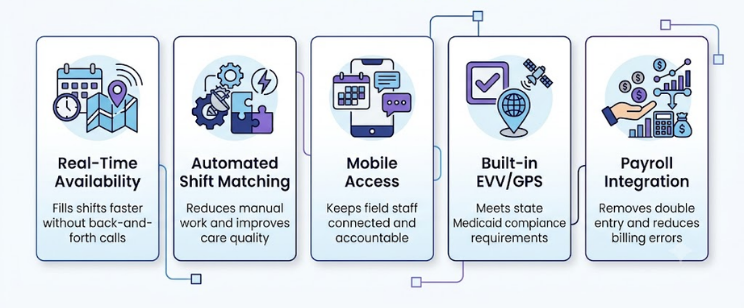
Feature | What It Does | Why It Matters |
Real-time availability tracking | Shows which caregivers are free and where | Fills shifts faster without back-and-forth calls |
Automated shift matching | Suggests best caregiver based on skills, location, preferences | Reduces manual work and improves care quality |
Mobile access for caregivers | Lets caregivers view schedules, clock in, and message from their phones | Keeps field staff connected and accountable |
Built-in EVV and GPS verification | Records visit start and end times and location automatically | Meets state Medicaid compliance requirements |
Payroll and billing integration | Syncs hours worked directly to payroll and invoicing systems | Removes double entry and reduces billing errors |
Real-Time Availability Tracking
This feature shows your scheduler exactly who is free, where they are, and when they can work. It removes the guesswork from filling open shifts. Instead of calling five caregivers to find one who is available, the system shows you the answer in seconds, which is one of the fastest ways to reduce caregiver scheduling time.
Automated Shift Matching
The best platforms, including AxisCare and CareSmartz360, use algorithms that factor in caregiver certifications, client needs, travel time, and stated preferences. The system suggests the best match. Your scheduler confirms it. This cuts matching time dramatically and improves care quality because the right caregiver goes to the right client.
Mobile Access for Caregivers
Caregivers work in the field, not in an office. A mobile app is not optional. It lets them view their schedule, clock in and out, receive updates, and message the office, all from their phone. Platforms like AxisCare and ShiftCare both offer iOS and Android apps with strong caregiver ratings.
Built-in EVV and GPS Verification
EVV stands for Electronic Visit Verification. It is a federal and state requirement that tracks when and where caregivers deliver services. Under the 21st Century Cures Act, all states must implement EVV for Medicaid-funded personal care services. Built-in EVV captures this data automatically at clock-in and clock-out, so your agency stays compliant without extra steps.
Payroll and Billing Integration
When scheduling data flows directly into your payroll and billing systems, your admin team stops re-entering data by hand. Errors drop. Payroll runs faster. Claims go out clean. Platforms like WellSky Personal Care and HHAeXchange both offer strong integration options for multi-payer agencies.
How Scheduling Software Supports EVV Compliance
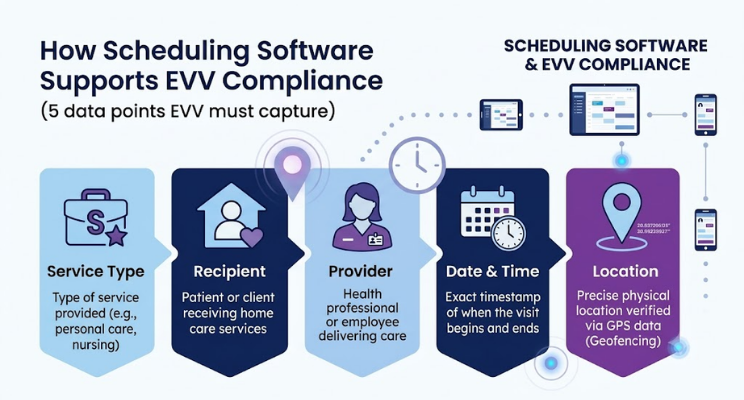
The 21st Century Cures Act requires all states to implement EVV for Medicaid-funded personal care and home health services. Agencies that miss EVV requirements face claim denials, audits, and financial penalties.
Here is what EVV must capture at every visit:
Type of service performed
Individual receiving the service
Individual providing the service
Date and time the service begins and ends
Location where the service is delivered
Scheduling software with built-in EVV captures all five data points automatically through GPS clock-in and clock-out. Agencies that still use manual EVV processes or bolt-on standalone systems create gaps in their data. Those gaps show up in audits, especially as CMS increases EVV scrutiny in 2026.
If your agency bills Medicaid, built-in EVV is not a nice-to-have. It is a requirement, and your scheduling software should handle it natively.
How Scheduling Software Improves Agency Profitability
Scheduling inefficiencies hit your bottom line in three specific ways. Good software addresses all three.
Reduced Overtime and Labor Costs
When shifts are matched to available caregivers based on hours already worked, your scheduler can avoid unnecessary overtime. The system flags when a caregiver is approaching overtime limits before the shift is assigned. That visibility alone can reduce labor costs significantly over the course of a month.
Fewer Missed Visits and Unbilled Hours
Automated reminders reduce no-shows. Real-time tracking shows when a caregiver has not clocked in, so your team can act before a visit is missed entirely. Every visit that gets completed and documented is a billable hour. Every missed visit is lost revenue and a compliance risk.
Lower Caregiver Turnover Costs
Replacing a caregiver costs your agency in recruiting time, training hours, and lost productivity during the gap. Industry estimates put the cost of replacing one caregiver between $2,500 and $5,000 when you factor in all those elements. Scheduling software that reduces frustration and supports work-life balance directly lowers that cost by keeping caregivers on your team longer. A home care virtual assistant dedicated to scheduling can cost less per month than a single caregiver replacement.
Why Home Care Scheduling Software Differs from General Tools
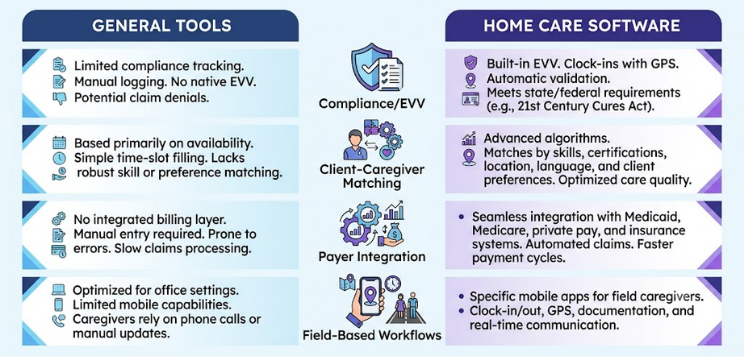
Google Calendar, Calendly, and general workforce apps do not work for home care. They were not built for this industry, and the gaps show up fast.
Here is how home care software differs from general tools:
Compliance requirements: Home care software includes built-in EVV; general tools do not
Client-caregiver matching: Home care software considers certifications, languages, and client preferences; general tools only look at time slots
Payer integration: Home care software connects to Medicaid, Medicare, and private pay billing systems; general tools have no billing layer
Field-based workflows: Home care software is built for staff working at client homes; general tools assume office-based teams
If your agency bills Medicaid or manages more than 15 caregivers, a general scheduling tool will create more problems than it solves.
Why Your Scheduler Matters as Much as Your Software
Even the best scheduling software requires a skilled person to operate it well. The scheduler role in home care is one of the most demanding in the office. It requires attention to detail, fast decision-making, strong communication, and a real understanding of how home care operations work.
Most schedulers handle dozens of active clients, manage constant caregiver availability changes, respond to last-minute callouts, and keep compliance documentation current, all at the same time. It is high-pressure work, and it is also one of the highest-turnover roles in the agency.
Tom Margolis from Interim HealthCare put it plainly: "We have an outstanding scheduler that has consistently outperformed most, if not all, the employees we had doing this job previously." He found that scheduler through ClearDesk, after struggling for months to find someone locally who could handle the role at that level.
Many agencies tell us the same thing. They invest in good software but cannot find or keep a skilled scheduler to run it. That is where a trained home care virtual assistant becomes a real solution.
How to Get the Most from Your Scheduling Software
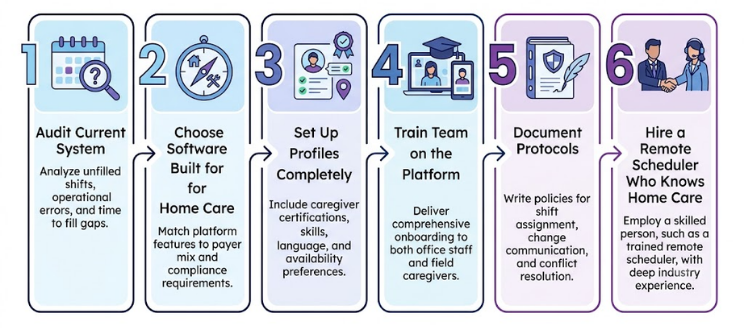
Software alone does not solve scheduling problems. Agencies need the right processes and the right people to get full value from their investment.
Here is a step-by-step process we walk agencies through when they want to improve scheduling operations:
Audit your current system. Identify where shifts go unfilled, where errors happen most, and how long it takes to fill a last-minute gap.
Choose software built for home care. Match the platform to your payer mix and compliance requirements before committing.
Set up your caregiver profiles completely. Include certifications, language skills, location, and availability preferences so the matching engine has accurate data to work with.
Train your full team on the platform. Office staff and caregivers both need to use the system consistently. Inconsistent adoption creates data gaps.
Document your scheduling protocols. Write down how shifts are assigned, how changes are communicated, and how conflicts get resolved. This protects your process when staff turns over.
Hire a scheduler who knows home care. Software proficiency alone is not enough. The person running your schedule needs to understand home care operations, caregiver management, and compliance requirements.
Train Your Team on the Platform
Thorough onboarding for both office staff and caregivers is essential. When caregivers do not know how to clock in correctly or view their schedule, the data in your system becomes unreliable. That unreliable data flows into your billing and compliance records.
Establish Clear Scheduling Protocols
Documented policies on shift assignment, change communication, and conflict resolution protect your agency when your scheduler is out sick or leaves the role. Without documentation, institutional knowledge walks out the door with them.
Hire Skilled Schedulers Who Know Home Care
The scheduler role requires industry knowledge, not just software skills. Agencies that struggle to find and keep qualified schedulers locally often turn to trained remote schedulers who specialize in home care. At ClearDesk, we place vetted remote schedulers with home care agencies across the country. Our team processes more than 55,000 applications per quarter and accepts less than 0.5% of candidates, so the people we place are genuinely skilled at this work.
Jeff Pitts, Owner and CEO of Comfort Keepers Western Colorado, described the impact directly: "He's become confident handling complex scheduling, assisting with confirmations, and ensuring clarity in all tasks. His work ethic, documentation, and collaboration with the scheduling team have made a meaningful impact on our day-to-day operations."
If your scheduling operations need support now, Book a Discovery Call to talk through what a trained remote scheduler could handle for your agency.
The Right Technology and Talent to Scale Your Home Care Agency
Scheduling software is essential. But it works best when a skilled, reliable person operates it every day. The combination of the right platform and the right scheduler is what actually moves the needle on missed visits, caregiver retention, and billing accuracy.
At ClearDesk, we help home care agencies find trained remote schedulers who can operate platforms like AxisCare, WellSky Personal Care, CareSmartz360, and HHAeXchange from day one. We hold a 4.9 out of 5 client satisfaction rating and have been recognized in Forbes for our approach to remote staffing. Our clients include Senior Helpers franchises, Comfort Keepers locations, Synergy HomeCare agencies, and Home Instead offices across the country.
Robyn Shea, Client Services Manager at Senior Helpers of High Point, described her experience this way: "The process of meeting and interviewing candidates to onboarding and training was seamless and very smooth. They have become part of our team and play major roles in keeping our scheduling function running smoothly."
If finding and keeping a strong scheduler is holding your agency back, we can help. Book a Discovery Call to see how a trained remote team member can support your scheduling operations starting this week.
Frequently Asked Questions
Q: What is the best scheduling software for caregivers in home care?
A: The best option depends on your agency's size, payer mix, and compliance needs. AxisCare works well for private duty agencies scaling past 20 caregivers. CareSmartz360 handles high-volume Medicaid billing across 40-plus states. WellSky Personal Care suits larger multi-location agencies. ShiftCare is a strong entry point for smaller or newer agencies. Evaluate each based on whether it includes native EVV, not a third-party add-on.
Q: How long does it take to implement caregiver scheduling software?
A: Most home care scheduling platforms can be set up within two to four weeks. Full adoption takes longer and depends on staff training and how cleanly your existing data migrates into the new system. Plan for at least 60 days before your team uses the platform consistently and correctly.
Q: Can caregiver scheduling software handle multiple payer types?
A: Yes. Most purpose-built home care platforms support Medicaid, Medicare, private pay, and insurance billing within one system. Platforms like CareSmartz360 and HHAeXchange are specifically built for multi-payer agencies and handle different billing rules and EVV requirements by payer type.
Q: What training do home care schedulers need to use scheduling software effectively?
A: Schedulers need hands-on training with the specific platform's features, including shift assignment, availability tracking, and EVV documentation. Beyond software skills, they also need to understand home care operations, caregiver management, and compliance requirements. Software proficiency without industry knowledge leads to poor scheduling decisions even when the tool is working correctly.
Q: How do I measure the return on investment from caregiver scheduling software?
A: Track six metrics before and after implementation: caregiver turnover rate, missed visit frequency, overtime hours per pay period, billing accuracy, time spent filling open shifts, and EVV compliance rate. Improvements in any of these areas translate directly to cost savings or revenue protection. Most agencies see measurable changes within the first 90 days of consistent use.
Q: Can a remote scheduler operate my home care scheduling software effectively?
A: Yes. Trained remote schedulers can operate platforms like AxisCare, WellSky Personal Care, and CareSmartz360 just as effectively as in-office staff. The key is finding someone with both platform experience and home care industry knowledge. At ClearDesk, the remote schedulers we place are vetted specifically for home care operations and can contribute from their first week on the job.


