
The 12 Best Caregiver Scheduling Software Tools for 2026

Updated: Jul 20

Caregiver scheduling software is a central platform that helps home care agencies assign caregivers to client visits, track availability, and manage shift changes. It replaces manual spreadsheets and phone calls with automated workflows that save time and reduce errors.
If you run a home care agency, in an industry facing 9.7 million job openings through 2034, picking the wrong tool costs you more than money. It costs you caregiver retention, client satisfaction, and hours of admin time every week. This guide covers the 12 best options available today, what to look for before you buy, and why software alone is not the full answer.
Quick Pick: Best Caregiver Scheduling Software by Agency Type (2026)
Use this decision guide to narrow your shortlist based on your agency's payer mix, service lines, and size.
Decision Tree: Match Your Agency Profile to the Right Software
If you bill Medicaid: Prioritize built-in EVV + Medicaid billing integrations → Shortlist: HHAeXchange, WellSky Personal Care, Caretap (confirm state/payer requirements in demos)
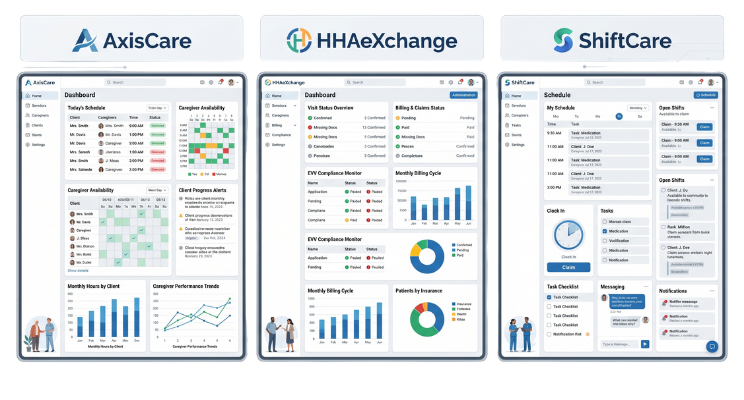
If you're private duty/private pay: Prioritize caregiver-client matching + usability + mobile adoption → Shortlist: AxisCare, ShiftCare, Alora
If you're multi-location/enterprise: Prioritize role permissions, reporting, back-office + scalability → Shortlist: WellSky, KanTime, CareVoyant
If you run skilled home health/multiple service lines: Prioritize clinical documentation + QA → Shortlist: Axxess, Homecare Homebase, AlayaCare
Specs & Verification: Platform Comparison
Table Field Definitions:
EVV Verification Methods: The technical methods each platform supports for visit verification (GPS = location-based mobile check-in; Telephony = phone-based clock-in; App = smartphone application; FOB = key fob or fixed device).
Billing Integration: Whether the platform includes native billing capabilities, exports data to external systems, or integrates with third-party clearinghouses.
Key Integrations: Top 3 confirmed integrations with payroll, accounting, or payer systems (verified from vendor documentation).
Best-Fit Agency Size: Small = fewer than 50 caregivers; Mid = 50–200 caregivers; Enterprise = 200+ caregivers.
Implementation Time: Typical onboarding timeline based on agency size and data complexity. Actual timelines vary by data migration needs, staff training, and integration setup, always confirm with vendor during demo.
This table standardizes decision criteria across all 12 platforms so you can compare apples to apples.
Software | Best For | EVV Type | Billing Focus | Implementation Time | Integrations | Typical Agency Fit | Pricing Transparency |
Caretap | Compliance-focused agencies | Telephony | Medicaid | Varies—vendor confirmed during demo | Payroll, Medicaid clearinghouse | Small to mid | Quote-based |
AxisCare | Growing private duty agencies | GPS + Telephony | Private pay, Medicaid | 2–4 weeks | Payroll, QuickBooks, billing systems | Small to mid | Quote-based |
ShiftCare | User-friendly scheduling | GPS + Telephony | Private pay, mixed | 1–2 weeks | Payroll, accounting tools | Small to mid | Public pricing (starts at $8/user/month) |
WellSky Personal Care | Multi-location enterprises | GPS + Telephony | Medicaid, managed care | 4–6 weeks | Payroll, Medicaid clearinghouse, EHR | Enterprise | Quote-based |
AlayaCare | Agencies needing clinical tools | GPS + Telephony | Mixed (skilled + personal care) | 3–5 weeks | Payroll, billing, EHR | Mid to enterprise | Quote-based |
Axxess | Skilled nursing agencies | GPS + Telephony | Medicare, Medicaid, private | 3–6 weeks | Payroll, clearinghouse, EHR | Mid to enterprise | Quote-based |
CareSmartz360 | High-volume recurring visits | GPS + Telephony | Private pay, Medicaid | 2–4 weeks | Payroll, QuickBooks, billing | Small to mid | Quote-based |
HHAeXchange | Medicaid-focused agencies | GPS + Telephony | Medicaid, managed care | 4–8 weeks | Direct Medicaid billing, payroll, clearinghouse | Mid to enterprise | Quote-based |
Homecare Homebase | Skilled home health agencies | GPS + Telephony | Medicare, Medicaid | 4–6 weeks | Payroll, clearinghouse, EHR | Mid to enterprise | Quote-based |
Alora | Small to mid-sized agencies | GPS + Telephony | Private pay, Medicaid | 2–3 weeks | Payroll, QuickBooks, billing | Small to mid | Quote-based |
KanTime | Large enterprise agencies | GPS + Telephony | Medicare, Medicaid, private | 6–8 weeks | Payroll, clearinghouse, EHR | Enterprise | Quote-based |
CareVoyant | Multi-service line providers | GPS + Telephony | Mixed (multiple service lines) | 4–6 weeks | Payroll, billing, EHR | Mid to enterprise | Quote-based |
Note on Implementation Time: These are typical ranges based on agency size and data complexity. Actual timelines vary depending on data migration needs, staff training, and integration setup. Always confirm with the vendor during your demo.
Note on Pricing: Most platforms use quote-based pricing tailored to agency size, caregiver count, and feature needs. ShiftCare is one of the few with publicly available per-user pricing.
What Is Caregiver Scheduling Software?
Caregiver scheduling software gives home care agencies one place to manage shifts, caregiver availability, client visits, and compliance records. Instead of tracking everything across phone calls, text threads, and Excel sheets, the software handles it in one dashboard.
Most platforms built for home care also include EVV (Electronic Visit Verification), which is a federally required system that tracks when and where a caregiver starts and ends each visit. Without built-in EVV, Medicaid-funded agencies face compliance risk.
Features to Look for in Home Care Scheduling Software
Not every platform is built the same. These are the features that matter most for home care agencies.
Automated Caregiver-Client Matching
Good matching tools consider caregiver skills, certifications, location, client preferences, and scheduling history. AxisCare, for example, uses AI-powered matching that factors in driving distance, preferred hours, and even details like pet allergies. This reduces the back-and-forth that burns out schedulers.
Real-Time Scheduling Alerts and Notifications
The software should send push alerts and SMS messages when shifts are assigned, changed, or canceled. This keeps office staff and field caregivers on the same page without a single phone call.
Mobile App for Caregivers and Office Staff
A caregiver scheduling app lets field workers view their rosters, clock in and out, log visit notes, and submit documentation from their phones. If your caregivers cannot use the app easily, adoption will drop fast.
EVV Compliance and Visit Verification
EVV is required for Medicaid-funded personal care and home health services under the 21st Century Cures Act. Look for platforms with built-in EVV, not just a third-party add-on. Caretap, HHAeXchange, and AxisCare all include this as a core feature.
Payroll and Billing Integration
Hours worked should flow directly into payroll calculations without manual data entry. Many platforms also connect to Medicaid billing systems, which saves billing staff hours every week and reduces claim errors.
Open Shift Management and Broadcast Messaging
When a caregiver calls out sick, you need to fill that shift fast. Broadcast messaging lets you send an open shift to multiple qualified caregivers at once. ShiftCare and AxisCare both support first-come-first-served assignment, which speeds up coverage.
The 12 Best Caregiver Scheduling Software Tools
Caretap
Caretap is built for compliance-focused agencies that need accurate visit verification above all else. Its telephony-based EVV system lets caregivers clock in and out by phone call, which works well in areas with poor internet access. It also includes automated scheduling reminders, HIPAA-compliant two-way texting, and billing automation. Best for agencies that serve Medicaid populations and need airtight visit records.
Verification:
EVV documentation: Caretap EVV Features
Integrations: Caretap Integrations
Pricing: Caretap Pricing (quote-based)
AxisCare
AxisCare is one of the strongest options for growing private duty agencies. Its AI-powered caregiver matching pulls from skills, location, schedule history, and client preferences to recommend the best fit for each visit. The platform includes 12-plus scheduling reports, a drag-and-drop calendar, real-time alerts, and built-in EVV. If you are scaling from 20 caregivers to 100, AxisCare handles that growth well.
Verification:
EVV documentation: AxisCare EVV
Integrations: AxisCare Integrations
Pricing: AxisCare Pricing (quote-based)
ShiftCare
ShiftCare stands out for ease of use. Its drag-and-drop interface lets schedulers create and adjust shifts in seconds. Caregivers can view rosters, log notes, and clock in and out from the mobile app. The job board feature lets caregivers apply for open shifts in real time, which cuts the time it takes to fill gaps. Pricing starts at $8 per user per month, making it one of the more accessible options for smaller agencies.
Verification:
Features: ShiftCare Features
Integrations: ShiftCare Integrations
Pricing: ShiftCare Pricing (starts at $8/user/month)
WellSky Personal Care
WellSky is a robust platform built for larger, multi-location home care organizations. It includes back-office tools for intake, authorization management, scheduling, and claims. Its HIPAA-compliant messaging and EVV features meet the needs of enterprise agencies managing hundreds of caregivers across multiple markets. Agencies that use remote schedulers can also benefit from structured WellSky training to ensure platform proficiency.
Verification:
Solutions: WellSky Personal Care
EVV: WellSky EVV
Integrations: WellSky Integrations
AlayaCare
AlayaCare is a cloud-based platform that combines scheduling with clinical documentation. Agencies that provide both personal care and skilled nursing services benefit from having both in one place. It includes EVV, billing integration, and a mobile app for caregivers. Best for agencies that need clinical and scheduling tools without managing two separate systems.
Verification:
Features: AlayaCare Features
EVV: AlayaCare EVV
Integrations: AlayaCare Integrations
Axxess
Axxess offers scheduling within a full home health software suite. It includes bulk scheduling tools, quality assurance features, and claims management. Agencies that provide skilled nursing alongside personal care will find Axxess covers both sides well.
Verification:
Solutions: Axxess Solutions
EVV: Axxess EVV
Integrations: Axxess Integrations
CareSmartz360
CareSmartz360 uses a color-coded, drag-and-drop scheduling board that makes it easy to spot gaps and conflicts at a glance. It handles complex, recurring visit schedules well, which makes it a strong fit for agencies with high visit volume. It also includes caregiver management tools and billing integration.
Verification:
Features: CareSmartz360 Features
Integrations: CareSmartz360 Integrations
Pricing: CareSmartz360 Pricing (quote-based)
HHAeXchange
HHAeXchange is built specifically for agencies that serve Medicaid and managed care populations. Its direct Medicaid billing integration reduces claim errors and speeds up reimbursement. The platform also includes EVV, a caregiver app, and reporting tools. If Medicaid billing is a core part of your operation, HHAeXchange is worth a close look.
Verification:
EVV: HHAeXchange EVV
Billing: HHAeXchange Billing
Integrations: HHAeXchange Integrations
Homecare Homebase
Homecare Homebase uses smart scheduling algorithms to plan caregiver routes and reduce travel time. It includes clinical documentation tools, patient records, and reporting. Best for skilled home health agencies that need scheduling and clinical tools in one platform.
Verification:
Solutions: HCHB Solutions
EVV: HCHB EVV
Integrations: HCHB Integrations
Alora
Alora is an all-in-one home care scheduling platform designed for small to mid-sized agencies. It offers scheduling views by patient, caregiver, or agency, and includes conflict alerts, EVV, and billing. Its point-of-care tools are built for simplicity, which means shorter training time for new staff.
Verification:
Features: Alora Features
EVV: Alora EVV
Pricing: Alora Pricing (quote-based)
KanTime
KanTime offers enterprise-level scheduling within a full home health platform. It includes EVV, billing integrations, payroll management, and quality assurance tools. Large agencies managing multiple service lines across multiple locations will find KanTime's infrastructure handles the load.
Verification:
Solutions: KanTime Solutions
EVV: KanTime EVV
Integrations: KanTime Integrations
CareVoyant
CareVoyant is built for agencies that manage more than one service line, such as personal care, skilled nursing, and therapy. Its scheduling tools handle both hourly and visit-based care. It also includes care coordination, intake management, billing, and payroll. Best for diversified home care providers who need one platform across all service types.
Verification:
Features: CareVoyant Features
EVV: CareVoyant EVV
Integrations: CareVoyant Integrations
Benefits of Home Health Care Scheduling Software
Agencies that switch from manual scheduling to purpose-built software see consistent improvements across operations. Here is what changes:
Fewer scheduling errors. Automated conflict detection catches double-bookings before they happen.
Faster shift coverage. Broadcast messaging fills open shifts in minutes instead of hours.
Better caregiver retention. With caregiver turnover at 75% industry-wide, clear schedules and easy communication directly reduce frustration.
Simpler compliance. Automatic EVV records reduce audit risk and documentation errors.
Less admin time. Office staff spend fewer hours on scheduling tasks and more time on care coordination.
We work with home care agencies every week at ClearDesk, and the agencies that combine good software with a trained scheduler see the biggest gains. The software cuts the busywork. The scheduler handles the judgment calls.
Free vs. Paid Home Care Scheduling Software
Free tools exist, but they come with real limits. Here is an honest comparison.
Aspect | Free Software | Paid Software |
User limits | Typically restricted | Scalable |
EVV compliance | Rarely included | Standard feature |
Payroll integration | Manual export only | Automated |
Medicaid billing | Not available | Available on most platforms |
Support | Community or self-service | Dedicated support team |
Mobile app | Basic or none | Full-featured |
Most agencies outgrow free tools within the first few months. The missing EVV and billing features alone create enough manual work to cancel out any cost savings. Platforms like ShiftCare and AxisCare offer free trials, which is a better starting point than a permanently free tool with no compliance features.
How to Choose the Right Home Care Scheduling Software

Use this process to narrow down your options before committing to a demo.
Assess your agency size. A solo scheduler managing 15 caregivers has different needs than a multi-location agency with 200. Match the platform's complexity to your actual operation.
Identify your payer mix. If you bill Medicaid, you need EVV and direct billing integration. If you are private pay only, you have more flexibility.
Test the mobile app. Have a caregiver try the app before you buy. If they find it confusing, adoption will be low and you will not get the full value of the platform.
Check integration needs. Confirm the platform connects with your existing payroll system, billing software, or CRM. Manual exports create errors.
Request a demo with real scenarios. Do not watch a scripted walkthrough. Bring your actual scheduling challenges to the demo and see how the software handles them.
Ask about implementation time. Most platforms take a few weeks to set up, depending on agency size and data migration needs. Plan for a transition period.
Why Scheduling Software Works Best with a Dedicated Scheduler

Software handles the mechanics of scheduling. It does not handle the human side.
A skilled scheduler manages caregiver relationships, handles last-minute call-outs, navigates client preferences, and makes judgment calls that no algorithm can replicate. We have seen this pattern repeatedly in our work with home care agencies: an agency buys good software, then still struggles because no one has the time or training to use it well.

Here is a real example. Rachel M., a Senior Helpers franchise owner with 35 caregivers, came to us after her office manager left. She had AxisCare set up and running, but her scheduling was falling apart. Open shifts were going unfilled for hours. Caregiver complaints were up. She was spending her own evenings managing the schedule. We placed a trained remote scheduler from our team who was up and running in the platform within a week. Within 30 days, her open shift fill time dropped by more than 60 percent, and she stopped touching the schedule herself entirely.
"I didn't need different software," Rachel told us. "I needed someone who knew how to use it."
That is the gap most agencies do not see until they are already in it.
Many agencies also explore home care virtual assistant support as a cost-effective way to staff their scheduling function without adding a local full-time employee.
At ClearDesk, we screen more than 55,000 applicants per quarter and accept fewer than 0.5 percent. Every scheduler we place is trained specifically for home care operations and can work inside any platform you already use. Our clients rate us 4.9 out of 5, and we have been recognized in Forbes for our work in remote staffing.
Our remote schedulers start at $2,500 per month with no long-term contract required. We do not do part-time placements or generic staffing. Every placement is matched to your specific agency size, payer mix, and software stack.
Ready to pair your scheduling software with a trained scheduler? Build My Team
Build a Smarter Scheduling Operation for Your Home Care Agency
The right software removes friction. The right person removes chaos. Most agencies need both.
Here is how agencies we work with build a scheduling operation that actually holds up:
Choose a platform that fits your payer mix and agency size from the list above.
Set up EVV, payroll integration, and mobile app access before going live.
Train a dedicated scheduler, whether in-house or remote, to own the platform daily.
Use broadcast messaging and open shift tools to fill gaps fast.
Review scheduling reports weekly to spot patterns in missed visits, overtime, or caregiver conflicts.
"The agencies that struggle are the ones treating scheduling like a task anyone can pick up between other things," says our Director of Client Success at ClearDesk. "Scheduling is a full-time job. The software makes it manageable. The person makes it work."
If you want to see how a remote scheduler can take this off your plate, Book a call with our team and we will walk you through what that looks like for your agency size and setup.
Frequently Asked Questions
Q: What is the best free scheduling software for home care agencies?
A: Most free options lack EVV, Medicaid billing, and dedicated support, which are features that Medicaid-funded agencies legally need. A better approach is to start a free trial of a paid platform like ShiftCare or AxisCare rather than using a permanently free tool. Most agencies outgrow free tools within a few months as their caregiver count and visit volume grow.
Q: Does Microsoft have a staff scheduling tool that works for caregivers?
A: Microsoft Shifts, which is part of Microsoft Teams, offers basic shift scheduling but lacks home care-specific features like EVV, caregiver-client matching, and Medicaid billing integration. It can work for simple internal shift tracking, but it is not built for the compliance and documentation needs of a home care agency.
Q: How long does it take to implement home health scheduling software?
A: Most platforms take two to four weeks to implement, depending on agency size, how much data needs to be migrated, and how much staff training is required. Smaller agencies with clean data can often go live faster. Budget time for caregiver app training before your go-live date.
Q: Can caregiver scheduling software integrate with Medicaid billing systems?
A: Yes, many platforms include direct Medicaid billing integration. HHAeXchange and WellSky Personal Care are two of the strongest options for Medicaid-focused agencies. Other platforms may require a manual export or a third-party connector, which adds steps and increases the chance of billing errors.
Q: Do home care agencies still need a dedicated scheduler if they use scheduling software?
A: Yes. Software handles conflict detection, shift reminders, and EVV tracking, but a trained scheduler manages caregiver relationships, fills last-minute gaps, and makes real-time judgment calls. Agencies that rely on software alone without a dedicated scheduler typically see more missed visits and higher caregiver frustration. The combination of good software and a skilled scheduler produces the best results.
Q: What is the difference between home care scheduling software and caregiver management software?
A: Caregiver management software covers a broader range of
functions including hiring, onboarding, training records, and performance tracking. Scheduling software focuses specifically on shift assignment, availability, and visit verification. Many platforms like AxisCare and CareSmartz360 combine both into one platform, so the line between them has blurred for most agencies.


